VM backups
Development preview. This feature is in preview. Please send feedback to support@exe.dev.
backup copies a VM's disk to an S3 bucket configured via a Workload Identity
Federation integration. Backups are
desync chunk stores, and can be restored
both onto an exe.dev VM as well as independently of exe.
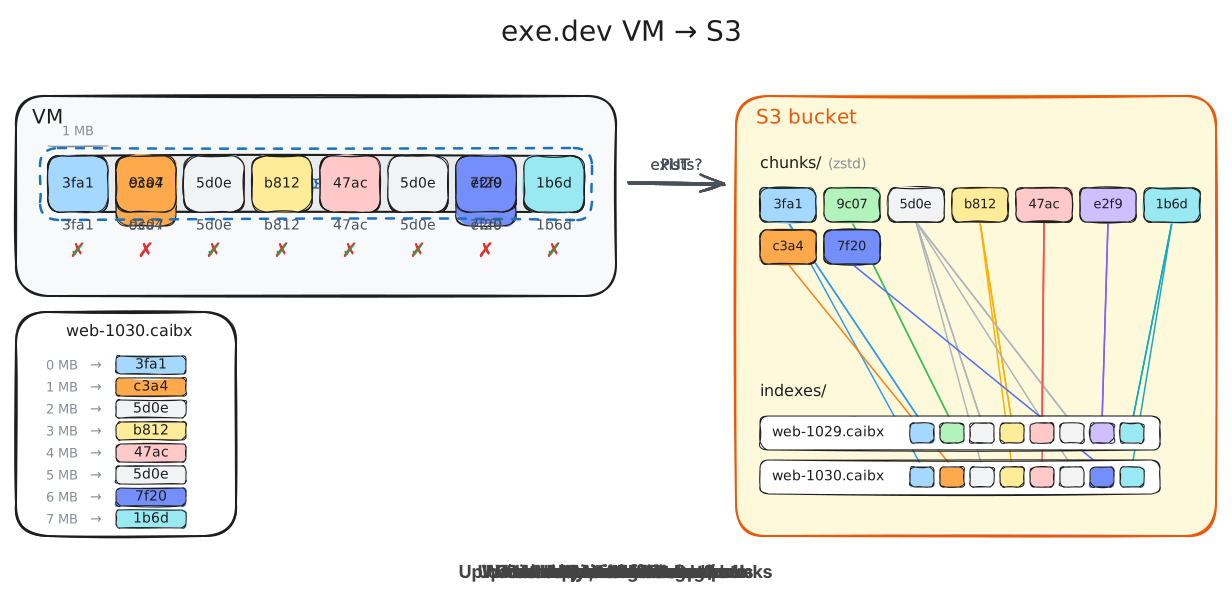
exe.dev snapshots your VM's disk, splits it into 1MB chunks, and uploads new chunks compressed to S3. Then, an index pointing to those chunks is uploaded as well. This follows the desync/casync format, and can therefore be restored not just on exe.dev, but anywhere you can mount an ext4 file system.
Setting up AWS and Exe
The best way to configure this is to point your agent at these docs.
Create an S3 bucket:
export AWS_ACCOUNT_ID=123456789012
export BUCKET_NAME=acme-exe-backups
export ROLE_NAME=exe-dev-backups
export AWS_ROLE_ARN="arn:aws:iam::${AWS_ACCOUNT_ID}:role/${ROLE_NAME}"
aws s3 mb "s3://${BUCKET_NAME}" --region us-west-2
Be aware that a chunk in this bucket being old does not imply that it is not part of a backup, so be wary of lifecycle rules that expire objects.
Create a workload identity integration for the role:
ssh exe.dev integrations add wif --name=backups --audience=sts.amazonaws.com \
  --consumer=aws --metadata=role_arn="$AWS_ROLE_ARN"
Set its Issuer and Subject in your shell:
export EXE_WIF_ISSUER=https://exe.dev/issuer/example
export EXE_WIF_SUBJECT=sub-ABCDEFGHIJKLMNOPQRSTUVWXYZ
export AWS_OIDC_CONDITION_PREFIX="${EXE_WIF_ISSUER#https://}"
export AWS_OIDC_PROVIDER_ARN="arn:aws:iam::${AWS_ACCOUNT_ID}:oidc-provider/${AWS_OIDC_CONDITION_PREFIX}"
Add the backup audience to the issuer's IAM OIDC provider:
aws iam add-client-id-to-open-id-connect-provider \
  --open-id-connect-provider-arn "$AWS_OIDC_PROVIDER_ARN" --client-id exe.dev/vm-backup
If you have no provider for the issuer yet, create it instead:
aws iam create-open-id-connect-provider \
  --url "$EXE_WIF_ISSUER" --client-id-list exe.dev/vm-backup
Create roles for backups:
cat > /tmp/exe-backups-trust.json <<EOF
{
  "Version": "2012-10-17",
  "Statement": [
    {
      "Effect": "Allow",
      "Principal": {"Federated": "${AWS_OIDC_PROVIDER_ARN}"},
      "Action": "sts:AssumeRoleWithWebIdentity",
      "Condition": {
        "StringEquals": {
          "${AWS_OIDC_CONDITION_PREFIX}:aud": "exe.dev/vm-backup",
          "${AWS_OIDC_CONDITION_PREFIX}:sub": "${EXE_WIF_SUBJECT}"
        }
      }
    }
  ]
}
EOF

aws iam create-role --role-name "$ROLE_NAME" --max-session-duration 43200 \
  --assume-role-policy-document file:///tmp/exe-backups-trust.json
Grant it the bucket:
cat > /tmp/exe-backups-policy.json <<EOF
{
  "Version": "2012-10-17",
  "Statement": [
    {
      "Effect": "Allow",
      "Action": "s3:ListBucket",
      "Resource": "arn:aws:s3:::${BUCKET_NAME}",
      "Condition": {
        "StringLike": {
          "s3:prefix": [
            "chunks/*",
            "indexes/*"
          ]
        }
      }
    },
    {
      "Effect": "Allow",
      "Action": "s3:PutObject",
      "Resource": [
        "arn:aws:s3:::${BUCKET_NAME}/chunks/*",
        "arn:aws:s3:::${BUCKET_NAME}/indexes/*"
      ]
    },
    {
      "Effect": "Allow",
      "Action": "s3:GetObject",
      "Resource": [
        "arn:aws:s3:::${BUCKET_NAME}/chunks/*",
        "arn:aws:s3:::${BUCKET_NAME}/indexes/*"
      ]
    },
    {
      "Effect": "Allow",
      "Action": "s3:DeleteObject",
      "Resource": [
        "arn:aws:s3:::${BUCKET_NAME}/chunks/*",
        "arn:aws:s3:::${BUCKET_NAME}/indexes/*"
      ]
    }
  ]
}
EOF

aws iam put-role-policy --role-name "$ROLE_NAME" --policy-name exe-dev-backups \
  --policy-document file:///tmp/exe-backups-policy.json
backup new needs only the ListBucket on chunks/* and the
PutObject; backup restore only the GetObject. To keep backups under a
prefix, pass --bucket=bucket/prefix and put the prefix in front of
chunks/ and indexes/ in the policy.
Back up and restore
backup new --bucket=acme-exe-backups --integration=backups web
backup list
backup status web-20261008-1910
backup watch web-20261008-1910
backup restore web-20261008-1910 web-restored
A backup syncs the VM's filesystem and snapshots its disk. With --freeze,
writes in the VM also pause briefly while the snapshot is taken.
Delete old backups
backup vacuum deletes the backups older than --keep-days (at least 7),
except each VM's newest, and then the chunks no remaining backup uses. Only
team admins can vacuum with a team's integration.
backup vacuum --bucket=acme-exe-backups --integration=backups --keep-days=30
Restore without exe.dev
A backup is a disk image holding one ext4 filesystem, with no partition
table. With AWS credentials that can read the bucket in S3_ACCESS_KEY,
S3_SECRET_KEY and S3_SESSION_TOKEN:
export STORE=s3+https://s3.us-west-2.amazonaws.com/${BUCKET_NAME}
desync extract -s "$STORE/chunks/" "$STORE/indexes/web-20261008-1910.caibx" disk.img
sudo mount -o loop,ro,noload disk.img /mnt